
Published May 18, 2026 - Updated May 18, 2026 - By Xilly
I Optimized a Ryzen 5 3600 and GTX 1650 Gaming PC in 2026
A stock Ryzen 5 3600 and GTX 1650 looked finished in 2026. After BIOS, RAM, Windows, driver, and game tuning, it became a playable competitive PC again.
PC Optimization Guides BIOS Optimization Guides RAM Optimization Guides Game Settings Optimization Guides Reduce Input Lag Guides
Budget PC Optimization · Ryzen 5 3600 + GTX 1650
A Ryzen 5 3600 and GTX 1650 is not new hardware anymore. On a completely stock Windows install, stock BIOS, stock memory behavior, and default driver setup, this PC looked like the kind of system most players would write off in 2026. The point of this test was simple: find out whether the hardware was actually dead, or whether the system was leaving performance on the table.
This article is based on the full Xilly test video: Optimizing the worst PC in 2026. The video shows the before-and-after gameplay in Fortnite, Valorant, and Call of Duty so you can see the difference instead of only reading FPS numbers.
The Test System
The PC used a Ryzen 5 3600 and a GTX 1650. Everything started completely stock: Windows had not been cleaned up, BIOS had not been tuned, memory was not manually optimized, and the graphics card was running as a normal low-end stock setup. This is close to how a lot of older budget gaming PCs are still being used.
That matters because older Ryzen CPUs are sensitive to memory latency, background load, boost behavior, and Windows overhead. A newer X3D CPU can hide some of those problems with a huge cache. A Ryzen 5 3600 cannot. If the RAM, BIOS, and Windows baseline are weak, the game feels it immediately.
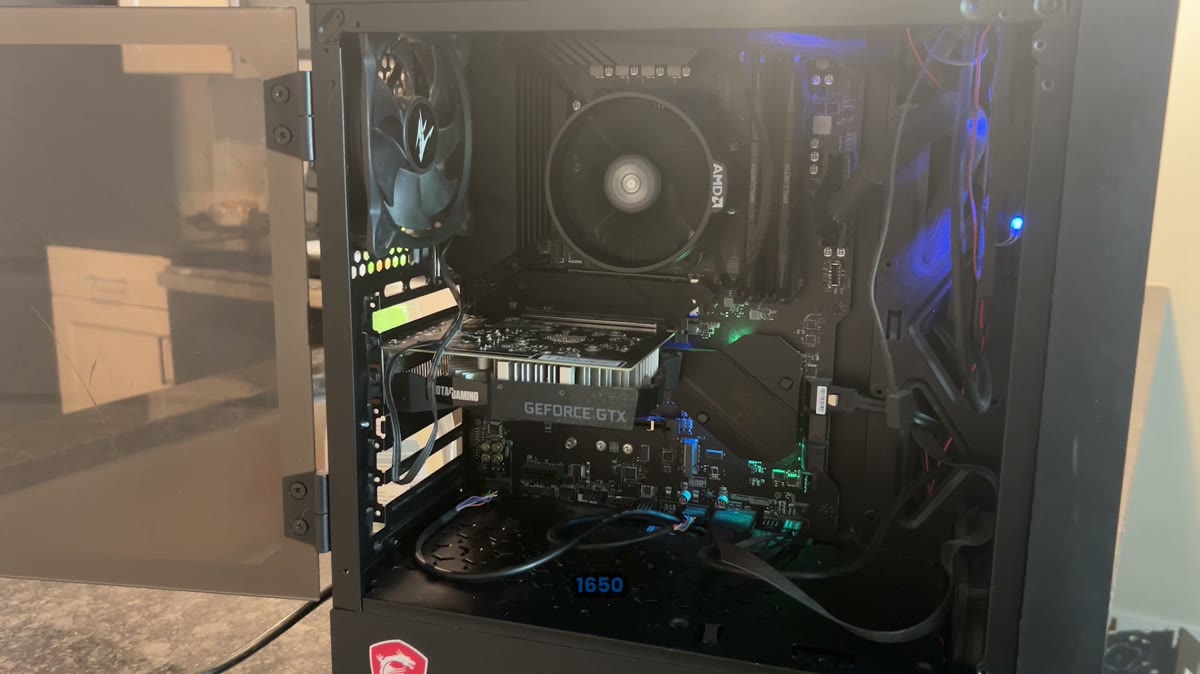
Six-core Zen 2 CPU. Still usable, but very sensitive to memory speed, timings, boost behavior, and background overhead.
Low-end single-fan graphics card. Fine for esports titles, but easy to bottleneck in modern heavy games.
The kind of setup most budget PCs are left on: playable in some games, but inconsistent under real match load.
Stock Performance Before Optimization
Before touching anything, the system was tested in Fortnite, Valorant, and Call of Duty. The averages were not always terrible, but the important issue was consistency. In competitive games, a high FPS number while standing still does not matter if the PC drops hard once a fight starts.
Fortnite Stock FPS
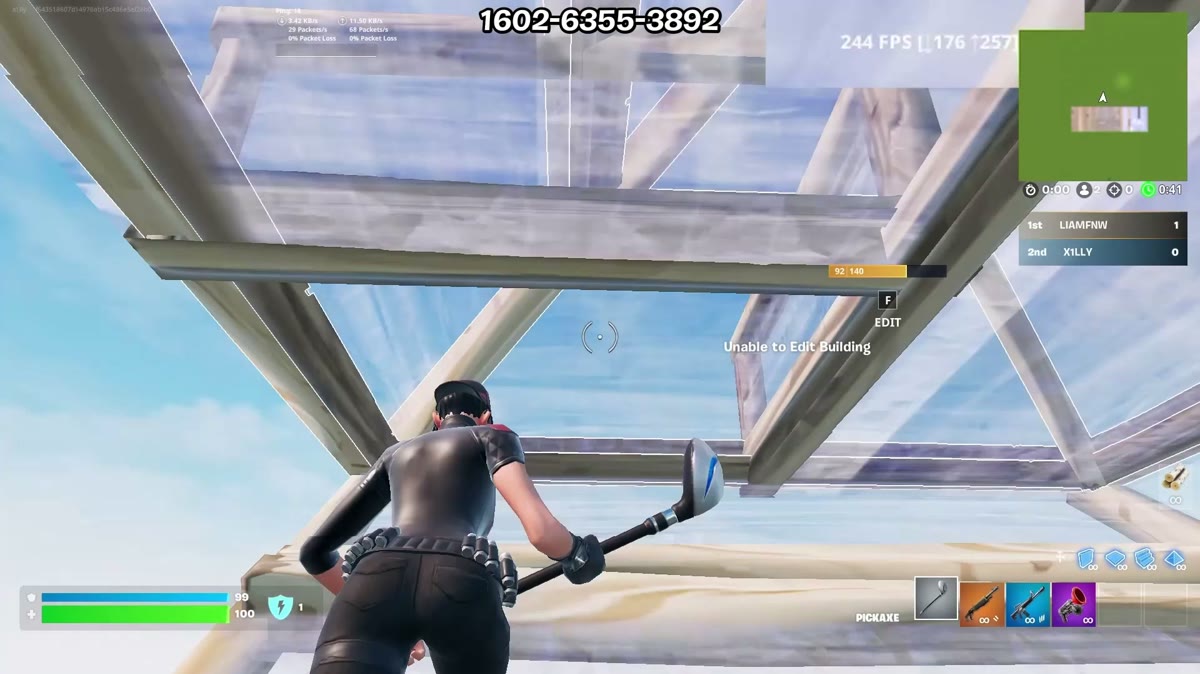
In a Fortnite creative 1v1 map, the system could show around 300 FPS while standing still. Once building and fighting started, it struggled to hold the 240 FPS range. During the 1v1, drops into the 180 FPS and sometimes 150 FPS range showed up. That is the exact kind of behavior that makes a PC feel inconsistent even when the average looks acceptable.
Valorant Stock FPS
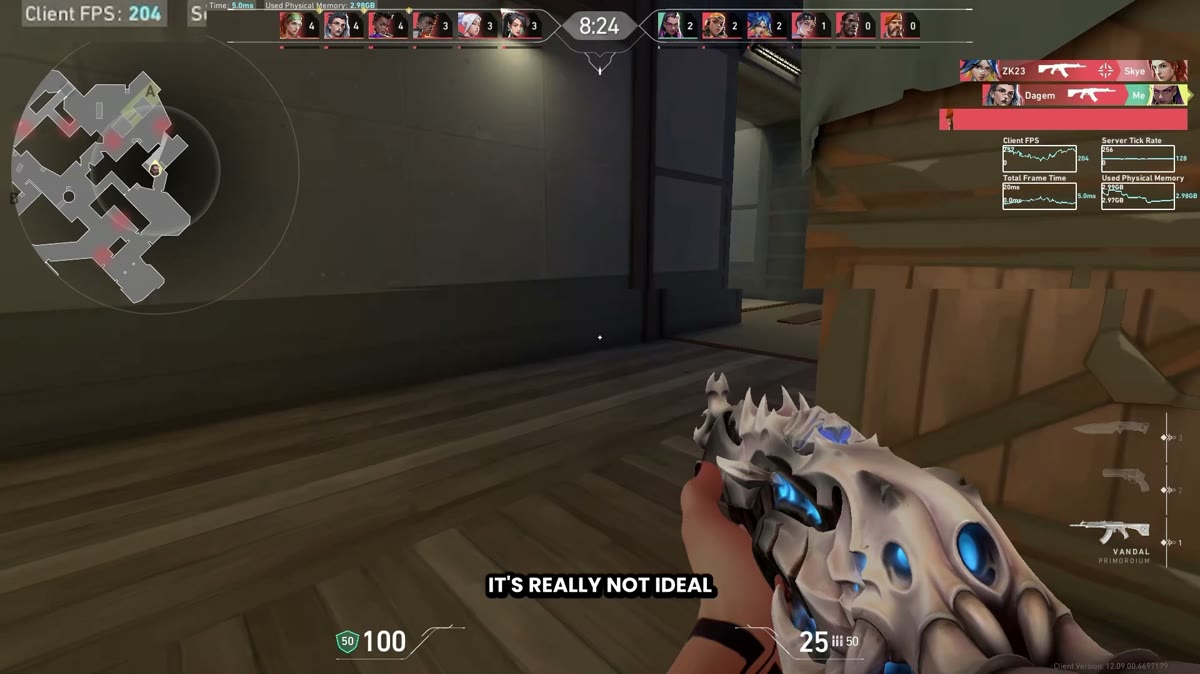
In the Valorant shooting range on low settings with uncapped FPS, the PC hovered around 480 FPS. That sounds good on paper, but deathmatch exposed the actual issue. In-game, it was closer to the 200 FPS range, with drops to 175 FPS and even around 130 FPS. The mouse feel was sluggish due to unstable frame times.
Call of Duty Stock FPS
Call of Duty was the hardest test. At 1080p minimum settings with Nvidia Image Scaling set to performance, the internal render resolution was effectively around 960x544. That is a huge quality tradeoff. Even with that, the benchmark showed about 115 average FPS, 84 low fifth, and 80 low first. The CPU side reported around 145 average FPS, 123 low fifth, and 111 low first.
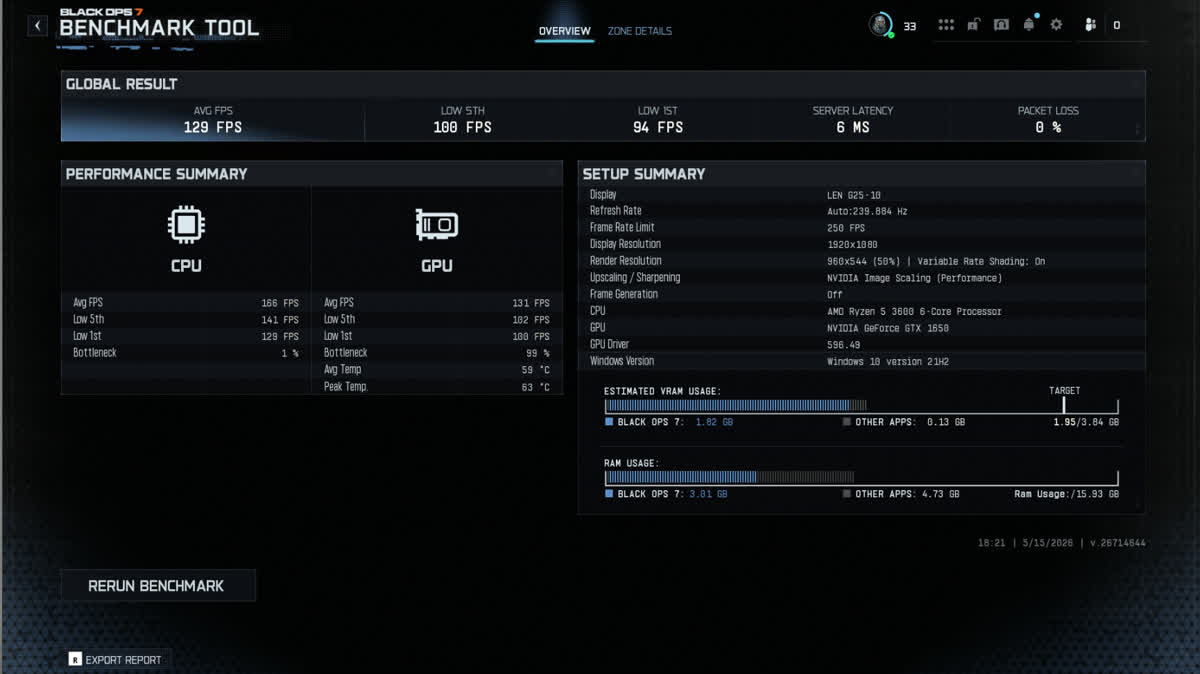
The issue was not only the FPS counter. The real problem was frame-time inconsistency: dips, stutters, and mouse feel that changed during actual gameplay. That is what makes a budget PC feel worse than the headline average suggests.
Why This PC Had More Performance Left
The Ryzen 5 3600 does not have 3D V-Cache. That means it depends heavily on how fast the RAM can feed the CPU. When the CPU runs out of fast local cache, memory latency and bandwidth matter more. On newer X3D chips, memory tuning can still help, but the giant cache reduces how often the CPU has to reach out to RAM. On this Ryzen 5 3600, RAM tuning was one of the biggest changes in the entire process.
Windows was the other major layer. A stock Windows installation is built for everyone, not for competitive gaming. It has scheduled tasks, background services, default power behavior, vendor utilities, and registry defaults that can wake up during games or stop the CPU from behaving consistently. That overhead matters more on older budget hardware because there is less headroom.
BIOS Changes That Mattered
The BIOS pass focused on removing unnecessary overhead, improving CPU boost behavior, and getting memory into a stronger configuration. On this system, virtualization-related settings such as SVM and IOMMU were disabled for the test where they were not needed. Precision Boost Overdrive was enabled and power limits were opened up so the CPU could boost more aggressively. A negative voltage offset near -0.1V helped the CPU run cooler while sustaining boost clocks.
Some games, anti-cheat systems, virtual machines, and security features need virtualization, SVM, IOMMU, or related options enabled. Valorant, FACEIT, and some protected environments may require them. Treat those settings as game-specific testing points, not universal advice.
The goal was not to underclock the CPU. The goal was to make the same CPU run cleaner, cooler, and more consistently so Precision Boost Overdrive had room to work. On an older Ryzen chip, that can be the difference between inconsistent clocks and a CPU that stays above 4 GHz more reliably in games.
The Biggest Change: Memory Tuning
The DDR4 XMP profile was enabled first, then the memory was pushed to 3733 MT/s. If your board labels this as A-XMP or AXMP, it is still the motherboard exposing the kit's XMP profile, not AMD EXPO. After that, voltages and timings were adjusted for the specific RAM kit. This part took real testing because memory tuning is not a one-size-fits-all copy paste. Too little voltage causes crashes. Too much voltage can create heat and long-term instability. Timings that work on one die type may fail on another.
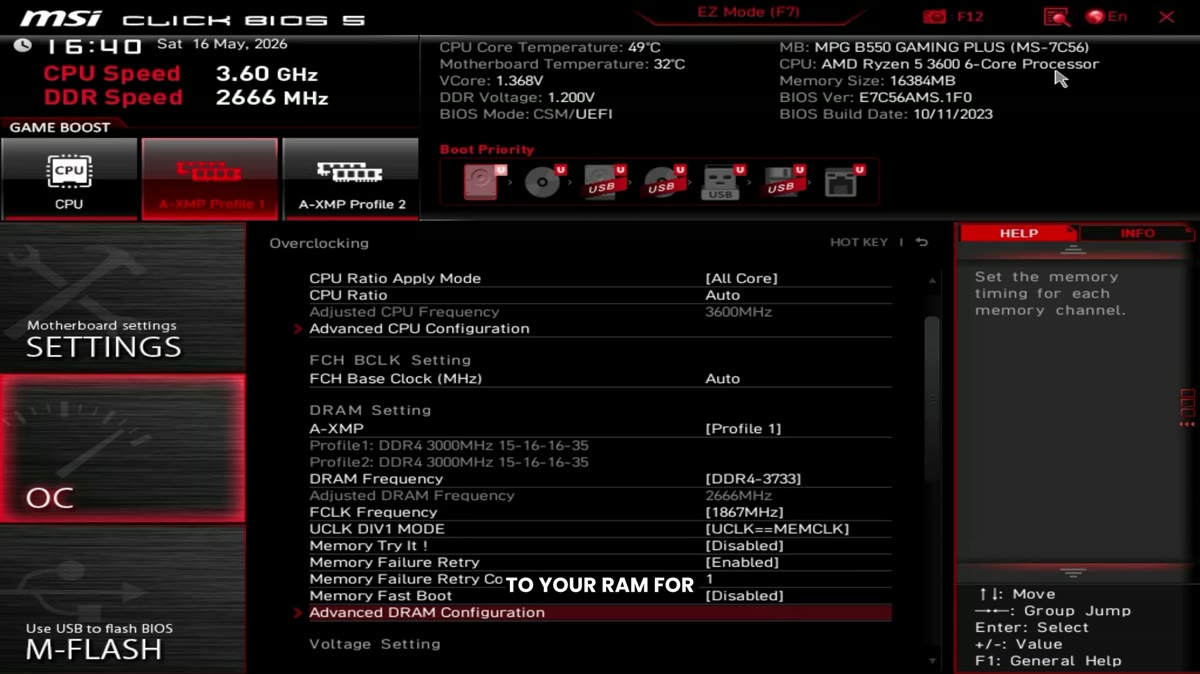
The Ryzen 5 3600 has a much smaller cache pool than modern X3D CPUs. When games need data quickly, the CPU leans on system memory more often. Faster memory and tighter timings help the CPU feed frames more consistently, which improves lows and frame time behavior in CPU-bound games like Fortnite and Valorant.
Windows Optimization
After BIOS, the system received the same Windows foundation used on client PCs: power plan behavior was tuned, registry settings were applied, background processes were cut down, and unnecessary services were reduced. The point was not to make Windows look different. The point was to stop Windows from interrupting games.
This matters on budget hardware because every background process has a larger relative cost. A high-end modern CPU can hide more overhead. A Ryzen 5 3600 has less room to waste. Cleaning up Windows helps frame-time consistency, reduces random stutters, and makes mouse input feel more predictable.
After Optimization: Fortnite Results
After the BIOS, memory, Windows, and driver work, Fortnite was tested again at 1080p Performance Mode with low/off settings and Nvidia Reflex enabled. Standing still, the system reached around 430 to nearly 500 FPS. More importantly, during building and 1v1 gameplay it stayed much closer to the 300 FPS range instead of falling into the 150 to 180 range like before.

On a GTX 1650, 1080p can still be heavy enough to create GPU-side latency. If this were a real client trying to squeeze the lowest input delay possible, dropping to 1600x900 would be worth testing. Lowering the render workload can help the graphics card deliver frames faster and clean up frame times.
After Optimization: Valorant Results
Valorant changed dramatically. In the shooting range, the system nearly hit 600 FPS. In deathmatch, it moved close to the 400 FPS range and the stutters that showed up before were no longer obvious in the same way. The total frame time dropped to around 3 ms per frame, which is a major difference for input feel.
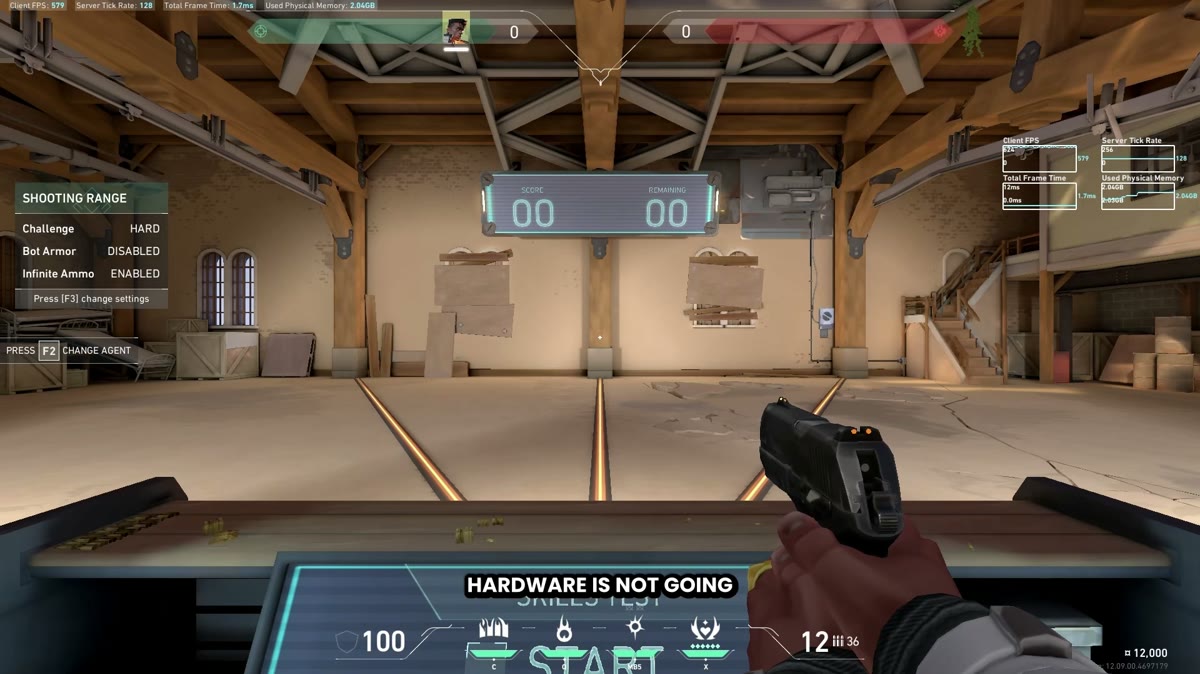
This is where the PC became surprisingly usable. If Valorant is the main game, this hardware is no longer the hard limit most people would assume it is. On a 240 Hz monitor, this configuration after tuning is realistic and playable, as long as settings stay low and the GPU is not pushed into unnecessary quality load.
After Optimization: Call of Duty Results
Call of Duty improved, but it also showed the limits of the GTX 1650. The benchmark moved into roughly the 150 FPS range, and the CPU-side average reported around 222 FPS. That is a clear improvement over stock, and it makes the game more playable, but the visual quality tradeoff is still rough because the GTX 1650 needs aggressive upscaling and low settings.
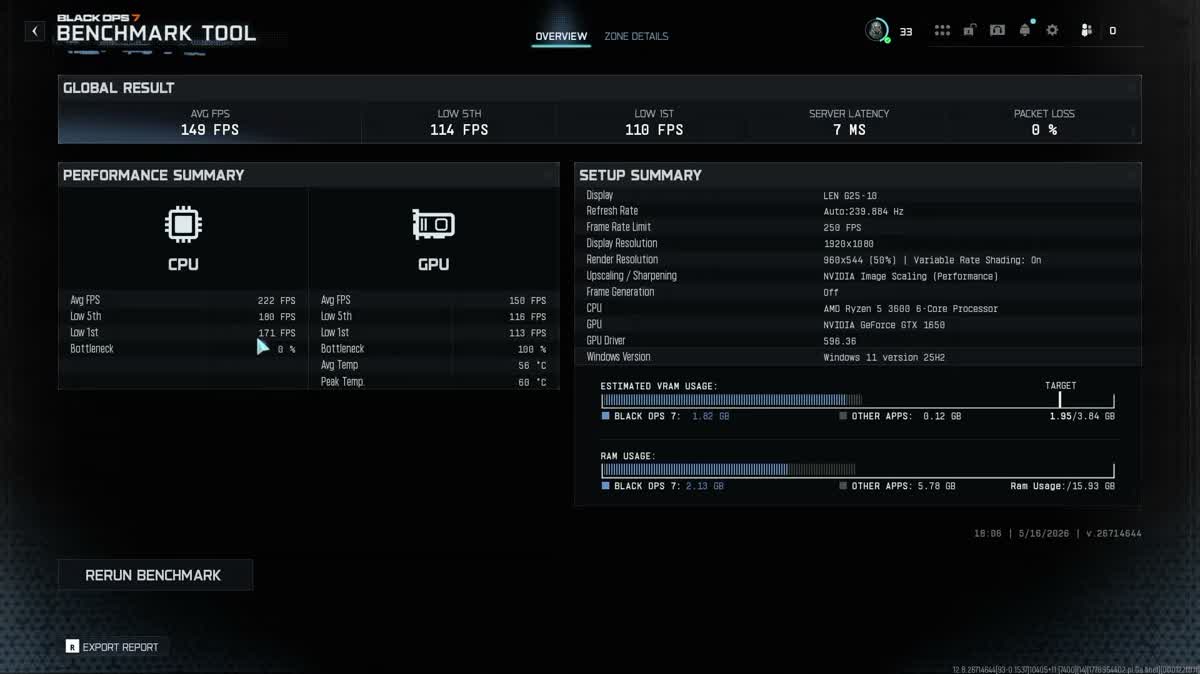
For Call of Duty on this kind of PC, Nvidia Image Scaling performance can work, but it looks bad. FSR or Intel XeSS may be worth testing to see whether they preserve a better native-resolution look while keeping enough performance. FidelityFX CAS only sharpens at native resolution and does not recover performance, which is not useful for a GPU-limited system like this.
Before and After Summary
Should You Upgrade or Optimize a PC Like This?
If you mainly play Valorant, Fortnite Performance Mode, CS2, or lighter esports games, a Ryzen 5 3600 and GTX 1650 can still be usable after proper tuning. The biggest wins come from BIOS, memory, Windows, and game-specific settings. If you mainly play Call of Duty or newer GPU-heavy titles, optimization helps, but the GTX 1650 remains the bottleneck. At that point, a GPU upgrade makes more sense.
The practical answer is simple: optimize first if the PC has never been tuned. If the system still cannot meet your target after the CPU, RAM, Windows, and driver stack is cleaned up, then upgrade the part that is actually holding it back. In this test, the CPU had more left than expected. The GPU was the bigger long-term limitation for heavy games.
Final Verdict
The Ryzen 5 3600 and GTX 1650 is not dead in 2026. It is just not a system that can afford to be left stock. On default Windows, default BIOS, and untuned memory, it feels older than it needs to. After tuning, it becomes a real esports PC again for games like Valorant and Fortnite.
That is the entire point of proper PC optimization. It is not magic, and it does not turn a GTX 1650 into a high-end GPU. It removes the wasted performance already sitting inside the system and makes the hardware behave consistently. For budget PCs, that difference can be massive.
Frequently Asked Questions
Is the Ryzen 5 3600 still good for gaming in 2026?
Yes, for esports games and lighter competitive titles. It needs a clean Windows setup, good memory behavior, and proper BIOS tuning to feel consistent. For heavier games, it can still be usable, but the GPU and target settings matter more.
Is a GTX 1650 still enough for Fortnite?
For Fortnite Performance Mode, yes, especially at low settings and with a tuned system. For the lowest input delay, testing 1600x900 can make sense because the GTX 1650 is easy to overload at 1080p.
Why did RAM tuning help this Ryzen 5 3600 so much?
The Ryzen 5 3600 does not have 3D V-Cache, so it relies more on system memory when games need data quickly. Higher memory speed and tighter timings can improve lows, reduce frame-time spikes, and help the CPU feed frames more consistently.
Should I disable virtualization or IOMMU for gaming?
Only if your games and security setup do not need them. Some anti-cheat systems, virtualization workloads, and Windows security features require virtualization-related settings. Test this per game instead of copying it blindly.
Should I upgrade this PC or optimize it first?
If the PC is completely stock, optimize it first. This test showed major gains from tuning alone. If you mainly play GPU-heavy games like Call of Duty, the GTX 1650 will still be the long-term upgrade priority.
Professional PC Optimization
Want This Done On Your Own PC?
BIOS, RAM, Windows, drivers, game settings, and latency tuning all have to work together. Xilly tunes the full stack for your exact hardware instead of applying generic one-click tweaks.
Built for competitive players who care about FPS, frame times, and mouse feel.