
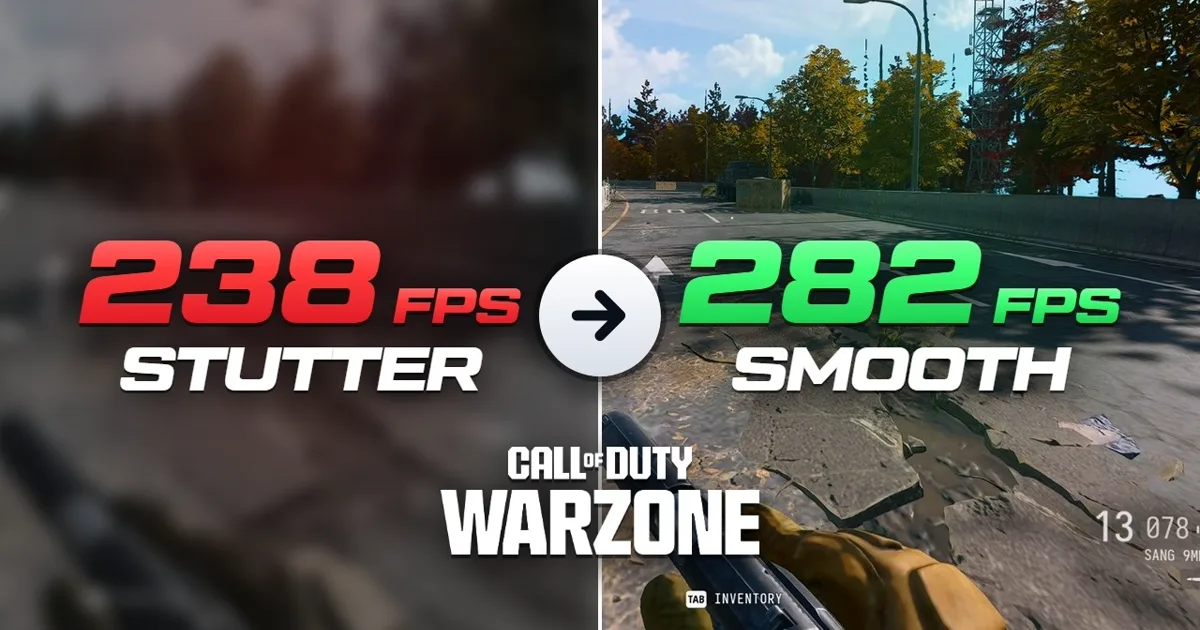
Warzone got 40 to 50 FPS slower after the November 7 update. If you followed our MW4 guide and your numbers are lower now, that is why: it is not your PC. It may get patched, it may not. Until then, this guide gets most of that FPS back and makes the game feel smooth again. On our Ryzen 9 9950X3D + RTX 5080 test PC at 1440p it took Warzone from 238 to 282 average FPS, and the 1% lows from 183 to 229.
Download the pack above and extract it to your desktop with 7-Zip (free, 7-zip.org) or WinRAR before you start. Do not use the built-in Windows extractor. Warzone uses the same config file and the same NVIDIA profile as Modern Warfare 4, so if you already did our MW4 guide, several steps are already done.
00 Warzone will not launch? Turn on TPM and Secure Boot
If Warzone shows an error about TPM or Secure Boot, one of them is off, and the game will not let you play online without both. If your game launches fine, skip to Step 1.
Restart your PC and press Delete or F2 repeatedly to enter the BIOS.
- AMD: go to Advanced → AMD fTPM Configuration and set Firmware TPM Switch to Enable Firmware TPM.
- Intel: the same setting is called PTT. On ASUS boards it is under Advanced → PCH-FW Configuration → PTT. Set it to Enabled.
- Secure Boot: go to Boot → Secure Boot and set OS Type to Windows UEFI Mode. That is all it takes on ASUS boards.
Press F10 to save and exit. Still getting the error? Your BIOS may need updating: follow our BIOS update video. A BIOS update resets every setting, so turn EXPO or XMP back on afterwards.
01 Run a baseline benchmark
Before changing anything, get a starting number. Launch the game and let the shaders finish compiling.
If you own Modern Warfare 4
- Go to Multiplayer, click the gear icon in the top right, then Graphics.
- Open Benchmark and click Start.
- When it finishes, take a screenshot of the results.
If you only play Warzone
- Load into Warzone and go to the same spot on the map. You will come back to exactly this spot at the end.
- With the NVIDIA App: press Alt + Z → Statistics → Custom, and turn on FPS and 1% Low. Press Alt + R in game to show or hide the overlay.
- No NVIDIA App? Turn on the FPS counter built into Call of Duty, under Settings → Interface.
- Take a screenshot, then close the game.
02 Clean driver install
This removes your current graphics driver along with any tweaks from other guides, so you start from a clean slate.
NVIDIA: DDU
- Open the "1 - DDU" folder in the pack and install Display Driver Uninstaller.
- It will warn that you are not in Safe Mode. That is fine: click OK.
- Set the device type to GPU and make sure NVIDIA is selected.
- Click Clean and restart.
Radeon: use Factory Reset instead
Do not use DDU on a Radeon card. Download the latest AMD Software: Adrenalin Edition from AMD and tick Factory Reset in the installer (screenshot in "6 - Radeon graphics card"). Then skip to the Radeon settings in Step 4.
At the time of writing, the recommended Radeon driver, 26.10.1 from October 20, has a bug where it keeps writing to your SSD while the PC is idle, which shortens the SSD's life. Install the latest optional driver instead.
03 Install driver 617.42 with NVCleanInstall
- Open the "2 - NVCleanInstall" folder and launch NVCleanInstall.
- Do not pick the latest driver. Scroll down and pick 617.42. Right now it runs best in Call of Duty: newer drivers lose about 20 FPS.
- Click Next. Tick Legacy Control Panel, and HD Audio if you use audio over HDMI.
- Tick the NVIDIA App too. We recommend keeping it for this guide, because the Preset K trick at the end uses it.
- On the next page, tick only the first two options, then Next and Install.
Skipped the NVIDIA App and have no NVIDIA Control Panel afterwards? Open the Microsoft Store, search for NVIDIA Control Panel and install it.
04 Best NVIDIA and AMD driver settings for Warzone
First, right-click the desktop → Display settings → Advanced display, set your refresh rate to the highest value and click Keep changes.
NVIDIA Control Panel
Using the NVIDIA App instead? The same settings are under Graphics → Global Settings.
AMD Software (Radeon)
05 Resizable BAR (ReBAR) in Profile Inspector
- Open the "3 - Nvidia Profile Inspector" folder and launch it.
- In the Profiles box at the top, type Call of Duty: Modern Warfare 4 and select it. Warzone uses the same profile.
- Scroll down to rBAR - Feature and set it to Disabled.
- Click Apply changes in the top right.
When should ReBAR be on? Only if you are GPU bound, meaning your graphics card is the part that is maxed out: a lower-end card like an RTX 5060, or playing at 4K with high settings. For most people, leave it off, especially if your CPU is weaker than your graphics card. Warzone is very CPU heavy, and that is exactly where ReBAR hurts your lows. Our on vs off numbers are further down.
Also open the config file (Step 6) in Notepad, press Ctrl+F, search for GPUUploadHeaps and set it to true. Leave it on false if ReBAR is off.
On a Radeon card there is no ReBAR toggle in the driver, so you turn it off in the BIOS instead (Step 9).
06 Install the config file
Warzone uses the same config file as Modern Warfare 4, so if you already did this in our MW4 guide, you are set. It sets nearly all of your graphics settings for you.
- Close the game.
- Press Win + R, paste %localappdata%\Activision\Call of Duty\players and press Enter.
- Back up your own s.1.0.cod26.txt by copying it somewhere safe.
- Copy s.1.0.cod26.txt from the "4 - Config" folder into players and click Replace the file in the destination.
- Relaunch Call of Duty. If it asks to reset your settings, click No. Yes undoes the config.
07 Best Warzone graphics settings
The config handles almost everything, so you only need to check a few things under the gear icon → Graphics.
08 Windows settings
- Right-click the desktop → Display settings → Graphics, and turn on Hardware-accelerated GPU scheduling.
- Search "power plan", open Choose a power plan and pick High performance. On a dual-CCD Ryzen 9 X3D (7950X3D, 9950X3D) stay on Balanced and follow our dual-CCD setup guide.
- Win + I → Apps → Installed apps: uninstall anything you do not use, especially background software like Armoury Crate, Corsair iCUE, MSI Center and Copilot. These cause FPS drops.
09 BIOS settings
Restart and press Delete or F2 to enter the BIOS. ASUS names are shown; other boards use similar names. Screenshots are in the "5 - BIOS (AMD + Intel)" folder of the pack.
AMD Ryzen
Intel
Press F10 to save and exit. Prefer not to touch the BIOS yourself? That is exactly what our optimization service does.
Dual-CCD Ryzen 9 and laptops
On a dual-CCD Ryzen 9 like the 7950X3D or 9950X3D, keep Game Bar enabled and stay on the Balanced power plan so Warzone runs on the V-Cache cores. For the best performance in a game this CPU heavy, set it up properly with Process Lasso: it is all in our Ryzen 9 X3D dual-CCD guide.
On a laptop, keep it plugged in, leave the power plan on Balanced and make sure the game runs on your dedicated graphics card, either in Windows Graphics settings or your laptop's own software. On an ASUS laptop, swap Armoury Crate for G-Helper, a lightweight open-source alternative.
10 GPU overclock, then your final benchmark
Before the final benchmark, we really recommend overclocking your graphics card: it is close to free FPS. Every card is different, so follow our GPU overclock and undervolt guide, or at least apply a mild overclock.
Then run the MW4 benchmark again, or go back to the same spot on the map with the overlay on, and put the screenshot next to your Step 1 screenshot. You should see a clear jump in average FPS and 1% lows.
| Test PC: Ryzen 9 9950X3D + RTX 5080, 1440p, DLSS Performance | Average FPS | 1% low |
|---|---|---|
| Stock | 238 | 183 |
| After this guide (driver 617.42) | 282 | 229 |
| Same settings, before the Nov 7 update | 305 | 244 |
The game is still slower than it was before November 7, but this gets a big chunk of it back. Compare against your own before and after from this guide, not numbers from before the update.
Post your CPU, graphics card and before and after numbers in our Discord. We want to see them, and we will help if something looks off.
FPS still low? Check if your CPU is the bottleneck
This version of Warzone is very CPU heavy. To check, go to Settings → Interface → Telemetry and turn on GPU time and CPU time, then play for a bit. If CPU time is higher than GPU time, your CPU is the bottleneck: lowering graphics settings or using a lower DLSS mode will not do much, because the graphics card is already waiting on the CPU.
- Make sure every step above is done, especially the BIOS: EXPO, PBO and IOMMU off all help the CPU.
- On a dual-CCD Ryzen 9, make sure the game is actually running on the V-Cache cores.
- On an older or lower-end CPU, a CPU upgrade will help more than a new graphics card in this game. An X3D chip with its extra cache makes a huge difference.
ReBAR on vs off in Warzone
Here is why we leave Resizable BAR off. Same test PC, 1440p, DLSS Performance with the Transformer model, the same route on the same map both times.
| Ryzen 9 9950X3D + RTX 5080 | Average FPS | 1% low | 0.1% low |
|---|---|---|---|
| ReBAR off | 243 | 183 | 126 |
| ReBAR on | 254 | 173 | 86 |
ReBAR adds about 4% average FPS, but the 0.1% lows get over 30% worse. The 0.1% lows are the stutters you actually feel, especially on a big map when you drop in or rotate. Unless you are GPU bound, leave it off.
Bonus: more FPS with DLSS Preset K or CNN
These are optional. They trade a little or a lot of image quality for more FPS.
Preset K: around 10 to 15 more FPS
The newest DLSS model looks great but is heavier on your graphics card. Preset K looks almost the same and gives around 10 to 15 more FPS, so it is well worth it.
- NVIDIA App: Graphics → Program Settings → Modern Warfare 4 (Warzone has no entry of its own and uses this one). Find DLSS Override - Model Presets, click the edit icon, set Super Resolution to Preset K and click Apply.
- NVIDIA Profile Inspector: open the Call of Duty: Modern Warfare 4 profile and scroll to the DLSS settings. Turn on DLSS - Enable DLL Override, set DLSS - Forced Model Preset Profile to Custom, set DLSS - Forced Preset Letter to Preset K (Transformer Gen 1), then click Apply changes.
CNN: around 30 to 40 more FPS, but it looks worse
In game, under Quality, you can switch the DLSS model from Transformer to CNN. That is worth around 30 to 40 more FPS and noticeably better 0.1% lows, but the image is clearly worse: distant moving objects, like falling drones, look rough. In fast gameplay you may not notice.
If you forced Preset K in Profile Inspector, remove the override first: open the Modern Warfare 4 profile again, click the NVIDIA icon next to each DLSS setting to reset it to default, click Apply changes and relaunch the game.
Want maximum FPS and do not care about looks? Run CNN. Want it to look good and still run fast? Use Transformer with Preset K.
Common Warzone problems: stutters, crashes and low FPS
- Stuttering after a game update: verify the game files, let the shaders rebuild and check that your config file is still in place.
- Crashing: remove any GPU overclock first. If that does not help, your CPU or memory settings are probably unstable.
- Lower FPS than before November 7: that is the update, not your PC. Compare against your own before and after from this guide.
Next: MW4 optimization guide · Black Ops 7 PC optimization · Ryzen Curve Optimizer undervolt guide
Frequently Asked Questions
Why did my Warzone FPS drop after November 7?
The November 7 update made Warzone about 40 to 50 FPS slower on the same hardware and settings. It is not your PC. This guide gets a big chunk of it back: on our 9950X3D + RTX 5080 test PC, 282 average FPS after the guide versus 305 with the same settings before the update.
Which NVIDIA driver is best for Warzone?
Driver 617.42 at the time of writing. Newer drivers lost about 20 FPS in Call of Duty in our testing. Install it with NVCleanInstall from the pack.
Should I turn on Resizable BAR in Warzone?
Only if you are GPU bound, for example on a lower-end card or at 4K with high settings. On our test PC, ReBAR added about 4% average FPS but made the 0.1% lows over 30% worse. If you turn it on, set GPUUploadHeaps to true in the config file.
Does Warzone use the same config file as MW4?
Yes. Both use s.1.0.cod26.txt in %localappdata%\Activision\Call of Duty\players, and both use the Call of Duty: Modern Warfare 4 profile in NVIDIA Profile Inspector and the NVIDIA App.
Why will Warzone not launch on my PC?
Warzone needs TPM and Secure Boot for online play. Enable fTPM (AMD) or PTT (Intel) and Secure Boot in your BIOS. If the error stays, update your BIOS and turn EXPO or XMP back on afterwards.
What DLSS setting should I use in Warzone?
DLSS Performance with the Transformer model and sharpness maxed. Force Preset K for around 10 to 15 more FPS at almost the same image quality, or switch to CNN for around 30 to 40 more FPS if you do not mind a worse image.
What are the best Warzone graphics settings for PC?
Install our config file first: it sets nearly every graphics setting. Then use Fullscreen exclusive, turn Enhanced FOV off, and run DLSS Performance with the Transformer model and sharpness maxed (FSR 4 on AMD). Raise texture quality if you care about looks.
Should I turn off Enhanced FOV?
Yes, unless you really want it. Turning Enhanced FOV off is worth around 10 to 20 FPS on its own.
How do I know if my CPU is the bottleneck in Warzone?
Turn on CPU time and GPU time under Settings → Interface → Telemetry. If CPU time is higher than GPU time, your CPU is the bottleneck, and lowering graphics settings will not help much.
Is the Warzone optimization pack free?
Yes. It is a free zip with DDU, NVCleanInstall, NVIDIA Profile Inspector, our config file and BIOS and Radeon screenshots. No email needed.
Professional PC Optimization
Want The Rest Done For You?
This guide covers what you can safely do yourself. The biggest gains are different on every PC: RAM timings for your exact kit, your CPU dialed in and Windows stripped down for your setup. We do it live over AnyDesk and a Discord call, then test the results with you before the session ends.